
A practical agenda for product teams: who to invite, what to prepare, how to find threats with STRIDE and how to turn the result into work your engineers will actually do.
In short
A threat modelling workshop is a facilitated session where the people who build a product draw its data flows, ask what can go wrong, decide a response to each threat and turn agreed mitigations into backlog items. Keep the scope to one system or feature, use STRIDE as a prompt, and repeat the session whenever the design changes significantly.
Most product teams agree that threat modelling is worth doing and then never schedule it, because nobody knows what the session should look like. This guide is written by Devies, a Gothenburg-based product and engineering consultancy that facilitates secure design work for product companies. It gives you an agenda you can run next sprint. If you are still deciding whether you need a design review, a scan or a penetration test, start with pentest, vulnerability scan or threat modeling: which one do you need.
What is a threat modelling workshop?
A threat modelling workshop is a time-boxed session in which a cross-functional team analyses a model of its own system to find security and privacy problems before they are built or shipped.
The Threat Modeling Manifesto defines the activity as "analyzing representations of a system to highlight concerns about security and privacy characteristics". It frames the work as four questions, and a good workshop follows them in order:
- What are we working on?
- What can go wrong?
- What are we going to do about it?
- Did we do a good enough job?
The workshop is not an audit and not a test. Nobody attacks anything. Its value comes from putting the people who know the design in one room with a shared diagram, because the most expensive flaws are usually assumptions that nobody wrote down: "only our app calls this API", "the device network is private", "support staff never see personal data".
Done regularly, the sessions also work as practical cybersecurity training (cybersäkerhet utbildning) for developers, because they learn to spot the same patterns in their daily design decisions.
Who should attend, and what should you prepare?
The right group is small, between four and eight people, and covers the product, the architecture, the code and the operations of the system in scope.
Role
Why they are needed
Facilitator
Why they are needed
Keeps time, asks the questions, stops the session turning into a design debate
Product owner
Why they are needed
Knows what the feature must do and which risks the business can accept
Architect or tech lead
Why they are needed
Owns the design and can judge whether a mitigation is feasible
Two or three developers
Why they are needed
Know how the code actually behaves, including the shortcuts
Operations or platform engineer
Why they are needed
Knows deployment, secrets, logging and access in production
Security specialist (optional)
Why they are needed
Brings knowledge of attack patterns; useful but not a prerequisite
Prepare three things before the day:
- A clear scope. One feature, one service or one product release, written as a single sentence.
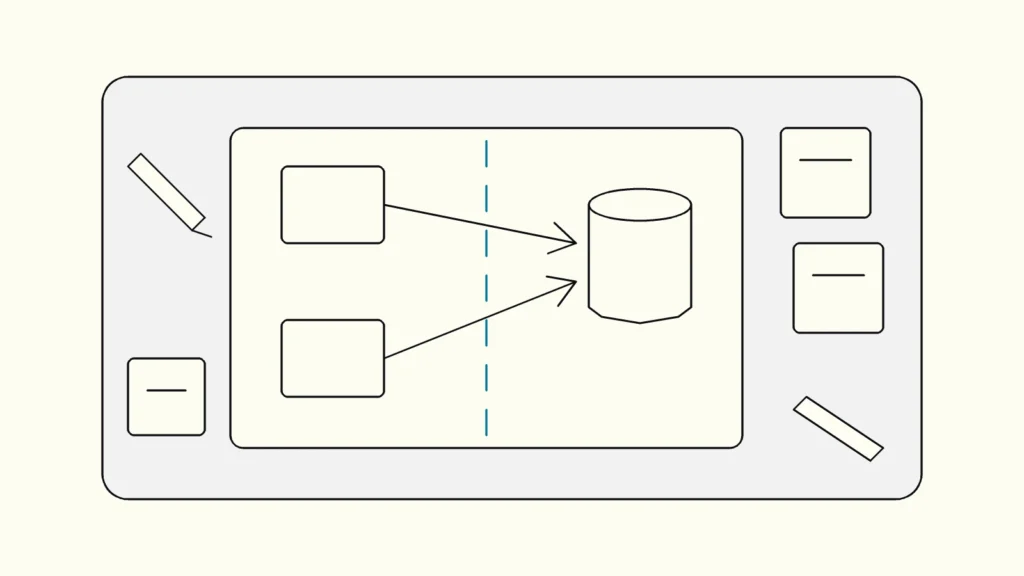
- A draft diagram. The tech lead sketches the components, data stores, external parties and main data flows in advance, so the session corrects a picture instead of starting from a blank board.
- Context. Which data is sensitive, which regulations apply, and which incidents or findings the team has had before.
How do you run the workshop, step by step?
Run threat modelling as a fixed sequence that follows the four questions, and spend most of the time on finding threats rather than drawing.
A half-day agenda that works for most product teams:
- Set the frame (15 minutes). Restate the scope, the four questions and the ground rules: no blame, no solving during the threat hunt, every idea goes on the board.
- Correct the diagram (30 minutes). Walk through the draft data flow diagram. Add missing flows, data stores and external entities. Then draw the trust boundaries: every place where data moves between different levels of trust, such as internet to API, service to database, or app to connected device.
- Find threats with STRIDE (60 to 90 minutes). Take each element and each boundary crossing in turn and ask the six STRIDE questions below. Write each threat as a short sentence: who does what, to which asset, with what effect.
- Rank the threats (20 minutes). Use a simple likelihood and impact scale. The OWASP Threat Modeling Cheat Sheet notes that teams may also weigh the effort to fix. Agree the top ten; the rest stay on the list.
- Decide a response (30 minutes). For each ranked threat choose mitigate, eliminate, transfer or accept, and record why.
- Turn mitigations into work (20 minutes). Write each agreed mitigation as a backlog item or security requirement with an owner, in the team's normal tool.
- Check the result (10 minutes). Ask the fourth question: did we cover every boundary, did anyone hold back a concern, what would we test to prove the mitigations work?
STRIDE is a mnemonic for six threat types, each the violation of a security property:
Threat
Property violated
Example question
Spoofing
Property violated
Authentication
Example question
Can someone pretend to be a user, device or service?
Tampering
Property violated
Integrity
Example question
Can data or code be changed in transit or at rest?
Repudiation
Property violated
Accountability
Example question
Could someone deny an action because nothing was logged?
Information disclosure
Property violated
Confidentiality
Example question
Can data leak through APIs, logs or error messages?
Denial of service
Property violated
Availability
Example question
Can someone exhaust a resource or block a flow?
Elevation of privilege
Property violated
Authorisation
Example question
Can a normal user reach admin functions or another tenant's data?
What should come out of the workshop?
A good workshop produces four artefacts: a corrected diagram, a ranked threat list, a recorded decision for every threat, and backlog items with owners.
The decision record matters more than teams expect. The OWASP cheat sheet describes four responses:
- Mitigate: reduce the likelihood or impact, for example with rate limiting or signed updates.
- Eliminate: remove the feature or component that creates the threat.
- Transfer: move responsibility to another party, such as a payment provider. OWASP notes that this does not reduce the harm itself, so record who owns the remaining risk.
- Accept: leave the risk in place, with a named person who made that call and a date to revisit it.
Feed the results into the rest of your secure software development process. Mitigations become acceptance criteria and test cases. Threats that a scanner can detect become automated checks. Anything that depends on a third-party component belongs in vulnerability management, so that a new advisory for that component is linked to the threat it affects. Store the diagram and decisions in the repository, next to the code they describe.
How often should you repeat threat modelling?
Repeat the workshop whenever the design changes in a way that moves a trust boundary, and review the model at least once per major release.
Typical triggers are a new external interface or API, a new type of personal or sensitive data, a new third-party integration or cloud service, changes to authentication or authorisation, and a serious incident or penetration test finding. Follow-up sessions are shorter than the first, because the diagram already exists.
Two frameworks make the case for doing this routinely. The NIST Secure Software Development Framework (SP 800-218) includes risk modelling, such as threat modelling, among the practices for designing software to meet security requirements. For products with digital elements sold in the EU, the Cyber Resilience Act requires manufacturers to assess cybersecurity risks and take them into account from planning and design onwards. As of October 2026, its reporting obligations have applied since 11 September 2026 and its main requirements apply from 11 December 2027, according to Regulation (EU) 2024/2847 on EUR-Lex. A dated threat model with recorded decisions is a practical part of the technical documentation that risk assessment calls for.
Keep reading
From our work
 Consilium and Devies Cybersecurity+Consilium Safety Group and Devies Cybersecurity+: a partnership for future-proof cybersecurity in fire, flame and gas safety systems.Read the case
Devies
Want a second opinion?
Devies, a Gothenburg-based product and engineering consultancy, works on questions like this with Nordic product and IT teams. Tell us where you are and we will suggest a sensible first step.
Frequently asked questions
How long should a threat modelling workshop take?
For one feature or service, plan for about half a day: roughly 30 minutes on the diagram, 60 to 90 minutes finding threats, and the rest on ranking, decisions and backlog items. A whole platform needs several sessions, one per subsystem. Shorter, focused sessions work better than one long day, because people lose concentration and the threat list stops growing after a few hours.
Do we need a security expert to run threat modelling?
No, but someone must facilitate. The people who build the system bring most of the value, because they know how it really works. A security specialist helps by suggesting attack patterns the team may not know. Many teams start with an external facilitator for the first sessions, then train an internal engineer or tech lead to run follow-ups as part of normal design work.
Which tools do we need for a threat modelling workshop?
A whiteboard or a shared diagramming tool is enough to start. Draw the data flow diagram, mark trust boundaries, and capture threats on sticky notes or in a shared table. Dedicated tools can generate threat lists from diagrams and keep models versioned, which helps once you run many sessions. Pick a tool after the method works, not before, and store the output next to the code.
What is the difference between STRIDE and other methods?
STRIDE is a checklist of six threat types used to find what can go wrong with each part of a system. Other methods have different focus: LINDDUN targets privacy threats, PASTA is a longer risk-centred process, and attack trees break one attacker goal into steps. STRIDE suits product team workshops because it is quick to learn and works directly on a data flow diagram.
Sources
- Threat Modeling Manifesto
- OWASP Threat Modeling Cheat Sheet
- NIST SP 800-218, Secure Software Development Framework (SSDF) Version 1.1
- Regulation (EU) 2024/2847 (Cyber Resilience Act), EUR-Lex
- Devies Cybersecurity+
- Devies, The Cyber Resilience Act: Alignment Workshop