
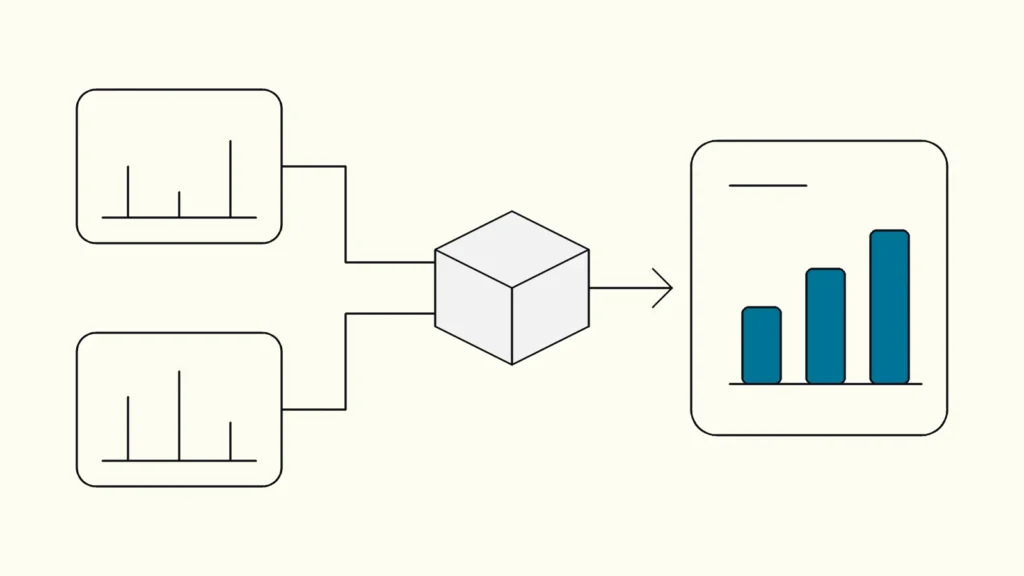
The causes behind conflicting KPIs, and how a shared data platform with master data gives you one version of the truth.
In short
Power BI rarely calculates wrong. Finance and sales see different numbers because their reports measure different things under the same name, use different dates or filters, or load data from different sources at different times. The fix is shared definitions, a common semantic layer and master data that every report builds on, not another dashboard.
When finance and sales disagree about last month's revenue, both reports are often working exactly as built. Sales may count confirmed orders, while finance counts posted invoices. Those are two different business events. Label both "revenue" and the gap looks like a technical fault in Power BI, when it is really a missing agreement about meaning.
This article is written by Devies, a Gothenburg-based product and engineering consultancy that builds data platforms and reporting for Nordic companies. It walks through the symptoms, the usual root causes and the three structural fixes: a semantic layer, master data and a shared data platform.
Symptoms: how conflicting numbers show up
Conflicting numbers show up as two credible answers to the same simple question, and as hours spent reconciling them by hand before anyone dares to present.
Most organisations recognise the pattern:
- The management team gets two answers to "how much did we sell last month?"
- Every Power BI dashboard has its own variant of the same KPI, with small differences in filters or calculation.
- Analysts reconcile figures in Excel before each board pack.
- The customer count in the CRM report differs from the one in the finance report.
- Nobody can say who owns the definition of a given metric.
A hypothetical example: sales reports SEK 1.2 million in orders accepted in September. Finance reports SEK 980,000 in September invoices. Some orders are not yet invoiced, and some September invoices relate to August orders. Neither total proves that anything is broken. What is missing is a bridge between the two figures and a decision about which measure to use in which context.
Root causes of conflicting KPIs in Power BI
The root causes of conflicting KPIs are almost always definitions, filters, refresh timing or joins, and each one can be checked in a fixed order before anyone touches the data model.
Different definitions
The most common cause is that the same word means different things. Does "revenue" include VAT, credit notes and cancellations? Which date places a deal in a period: order date, delivery date or invoice date? How is currency converted? Until this is written down, every report author builds their own interpretation.
Different filters and permissions
Two people looking at the same report can still see different populations. Slicers, page filters, visual filters and cross-filtering all change the result. Row-level security can also mean that a sales manager sees only their region while the controller sees the whole group.
Different refresh times
An imported model contains the data loaded at its last refresh. A successful refresh does not prove that the source had already received every record. If the CRM export finishes at 06:10 and the report refreshes at 06:00, the report quietly shows yesterday's position. Microsoft's data refresh documentation explains the difference between refreshing data and refreshing visuals.
Different joins and grain
A CRM opportunity is not an ERP invoice line. If tables are joined on a customer field that is not unique, the same amount can be counted several times. Microsoft's star schema guidance and its documentation on model relationships explain why facts, dimensions and consistent grain decide the totals.
Checklist for investigating a discrepancy
Compare one measure at a time and record the evidence:
Check
What to collect
Measure
What to collect
Measure name and written business definition
Population
What to collect
Companies, customers, products and statuses included
Period
What to collect
Date field, range and period-closing rule
Report
What to collect
Published version, workspace and semantic model
Access
What to collect
User role and any row-level security
Freshness
What to collect
Time of the last successful source load and model refresh
Then reconcile individual records, for example by invoice ID, for a small and clearly bounded period. A list of missing or duplicated records tells you more than two screenshots of different totals.
A semantic layer with shared measures
A semantic layer is a shared set of business definitions, such as customer, net sales and the reporting date, that is defined once and reused by every report.
When the same discrepancy returns in several reports, fixing one report at a time does not hold. In Power BI this layer usually takes the form of a shared semantic model that many reports build on. As of October 2026, Microsoft's guidance on sharing a semantic model describes granting Build permission so that others can create reports on the same measures without rebuilding them.
The benefit is that "order intake" and "invoiced revenue" become two clearly named measures instead of two competing readings of "revenue". A shared layer still needs governance:
- A named owner per measure, usually in the business rather than in IT.
- A process for changing definitions, tested against an agreed reference result.
- A clear separation between certified measures and local experiments.
Not every domain needs the same model. Finance and marketing can have good reasons for separate models, as long as shared concepts come from the same source.
Master data: one customer, one product, everywhere
Master data is the shared reference data that the business runs on: customers, products, items, organisational units and the chart of accounts.
Even with shared measures, the numbers will be wrong if the underlying master data (masterdata in Swedish) differs between systems. Typical problems are that the CRM organises customers by sales relationship while the ERP uses legal billing entities, that the same product carries different codes in different systems, and that a reorganisation reaches one system but not another.
Start narrow. Pick the master data that causes the most discrepancies, often customer, and work through these steps:
- Decide which system leads for each attribute.
- Create an explicit mapping between the systems' keys instead of matching on names.
- Show unmatched records in an exception list that someone owns.
- Appoint an owner who decides on duplicates and merges.
A full MDM programme is rarely the first step. A well-maintained customer and product mapping in the data platform often removes a large share of the discrepancies.
A shared data platform as the foundation for business intelligence
A shared data platform is where the semantic layer and master data live: it collects data from ERP, CRM and finance, cleans and joins it, and delivers decision-ready data to every reporting tool.
A common structure has three layers: raw data as it arrived from the source, cleaned and joined data, and decision-ready data with shared measures. The value for business intelligence is traceability. When a figure is questioned, you can follow it back to the source record and see which rule changed it. How those sources are connected in the first place is covered in our article on connecting ERP, CRM and finance systems.
Keep three habits regardless of architecture:
- Fix the smallest cause first. A hidden filter needs a report correction, not a new platform.
- Save a reference result: expected figure, source records and calculation rule, so the same question can be checked after future changes.
- Show in each report which period it covers and when its source data was last loaded.
Keep reading

From our work
 Client Case: Stena LineStena Line modernised its Azure data platform - improving Power BI reliability, reducing pipeline runtimes and scaling with medallion architecture.Read the case
Devies
Want a second opinion?
Devies, a Gothenburg-based product and engineering consultancy, works on questions like this with Nordic product and IT teams. Tell us where you are and we will suggest a sensible first step.
Frequently asked questions
Why do two Power BI reports show different totals for the same month?
Two reports usually differ because they use different metric definitions, filters, date fields, semantic models or refresh times. Compare those five factors first, one measure at a time. Then reconcile individual source records, such as invoice IDs, for a small and agreed period. A list of missing or duplicated records shows the real cause faster than comparing totals.
Should every Power BI report use the same semantic model?
Not necessarily. A shared semantic model helps related reports use the same measures, such as order intake and invoiced revenue, but it needs a named owner and a controlled way to change definitions. Separate domains like finance and marketing can keep their own models, as long as shared concepts such as customer and product come from the same master data.
Do we need a new data platform to get one version of the truth?
No, not always. A single filter or calculation error can be fixed in the existing report. Recurring discrepancies across several systems are a different signal: they usually mean you need shared definitions, mapped master data and a common data platform that every report reads from, so the same rule is applied everywhere.
What is the difference between a semantic layer and master data?
A semantic layer defines how measures are calculated, for example what counts as net sales and which date assigns it to a period. Master data defines the shared things those measures are about, such as customers, products and organisational units. You need both: correct formulas applied to inconsistent customer records still produce conflicting numbers.
Sources
- Microsoft Learn, Data refresh in Power BI
- Microsoft Learn, Understand star schema and the importance for Power BI
- Microsoft Learn, Model relationships in Power BI Desktop
- Microsoft Learn, Share access to a semantic model (updated 28 August 2026)
- Devies, Data Hub
- Devies, Client case Stena Line
- Devies, Data and AI Use Case Discovery Workshop