
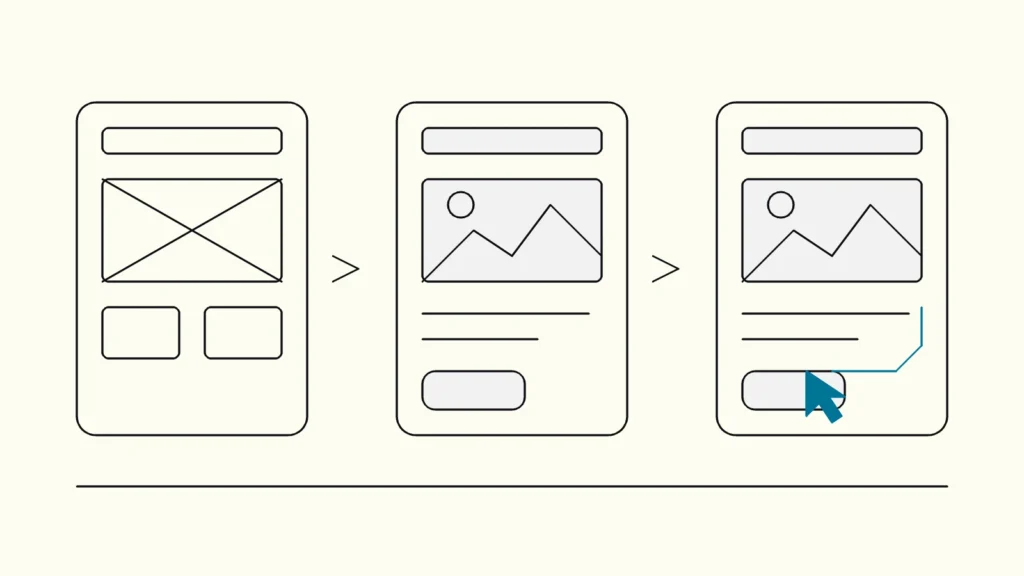
A plain comparison of the three most common design artefacts, what question each one answers, and how to choose the cheapest one that still gives you a reliable answer.
In short
Wireframes show structure, mockups show how a screen will look, and prototypes show how a product behaves. Make wireframes while layout and content are still open, mockups when the structure is agreed and the visual design needs sign-off, and prototypes when you need to test a flow with users before anyone writes production code.
Product teams often argue about whether to "do wireframes first" without agreeing on what a wireframe is for. This comparison is written by Devies, a Gothenburg-based product and engineering consultancy, for product owners, designers and development leads who need to decide what to produce next. It defines the three artefacts, compares them side by side and gives clear rules for when each one is worth the time.
What is the difference between wireframes, mockups and prototypes?
The difference is what each artefact is meant to decide: wireframes decide structure, mockups decide appearance and prototypes decide behaviour. Nielsen Norman Group's glossary of UX deliverables gives short definitions that most design teams recognise:
- A wireframe is a skeletal outline of a layout that represents the structure and functionality of an interface before visual design is considered. Boxes, labels and real headings, but no colours, imagery or brand styling.
- A mockup is a static, high-fidelity simulation of a proposed screen, including visual details such as colour, typography and imagery. It looks finished but does nothing when you click it.
- A prototype is an early version of a design used to test and validate ideas, interactions and functionality. It can be paper sketches stitched together or a clickable, near-real simulation.
The three are not strict stages. In her article on low- and high-fidelity prototypes, Kara Pernice of Nielsen Norman Group describes fidelity along three separate dimensions: interactivity, visuals, and content and navigation. A clickable set of grey boxes is a prototype with low visual fidelity; a polished but static screen is a mockup with high visual fidelity and no interactivity. Thinking in dimensions rather than labels helps you raise only the fidelity that your current question needs.
How do wireframes, mockups and prototypes compare?
Wireframes are cheapest and fastest to change, mockups are the most convincing for stakeholders, and prototypes are the only one of the three that lets you observe real use. The table compares them on the criteria that usually decide the choice.
Criterion
Wireframe
Mockup
Prototype
Question it answers
Wireframe
What goes where, and in which order?
Mockup
What will it look like?
Prototype
Can people use it to finish the task?
Fidelity
Wireframe
Low visual, low interactivity
Mockup
High visual, no interactivity
Prototype
Any visual level, some or full interactivity
Typical effort
Wireframe
Minutes to hours per screen
Mockup
Hours to days per screen
Prototype
Hours for a paper flow, days for a realistic one
Who reacts to it best
Wireframe
Product team, content owners, developers
Mockup
Stakeholders, brand and marketing
Prototype
Real or representative users
Can you test it with users?
Wireframe
Only roughly, by walking through it
Mockup
Only for first impressions and legibility
Prototype
Yes, this is its main purpose
Risk of skipping it
Wireframe
Arguing about colours before the structure works
Mockup
Visual surprises late in development
Prototype
Building a flow nobody can complete
Main trap
Wireframe
Treated as a spec with no explanation
Mockup
Approved as if it proves usability
Prototype
Mistaken for production-ready code
The final row matters most. Each artefact fails when it is used to answer a question it was not built for: a mockup that everyone likes says nothing about whether people can finish a form, and a prototype that tests well is not software.
When should you make wireframes?
Make them when the structure of a page or flow is still undecided and you want cheap, fast disagreement. They are the right tool at the start of a feature, during a redesign of navigation, and whenever several people hold different pictures of the same screen in their heads.
Choose a wireframe when:
- you are deciding what content and actions a screen needs, and in which priority;
- developers need to see the shape of a feature early to flag technical constraints;
- the team keeps debating visual details before the layout is settled;
- you want to compare two or three structural options in a single meeting.
Keep them honest by using real headings and realistic content lengths rather than placeholder text. A wireframe filled with filler text hides the most common layout problem: real content that does not fit. Annotate behaviour in short notes beside each wireframe, such as what happens on error or when a list is empty, so the wireframe works as a conversation piece rather than a silent spec.
When do you need a mockup?
You need a mockup when the structure is agreed and the remaining decisions are visual: hierarchy, spacing, colour, imagery and how the brand shows up. A mockup is also the artefact that helps stakeholders who struggle to imagine a finished product from grey boxes.
Choose a mockup when:
- marketing or leadership must approve the look before development starts;
- you are testing legibility, contrast or image quality on real screen sizes;
- the feature introduces a new visual pattern that the design system does not yet cover;
- developers need exact visual specifications for a few key screens.
If your team already has a mature design system, you may need far fewer mockups. Screens assembled from existing components look right by default, so a wireframe plus the component library is often enough. Reserve full mockups for new patterns and for screens that carry the brand, such as landing pages.
When is a prototype worth the effort?
A prototype is worth it whenever the risk lies in behaviour: a multi-step flow, an unfamiliar interaction or a task where a wrong turn costs money or trust. The GOV.UK Service Manual's guidance on making prototypes treats prototyping as the normal way to explore, share and test designs before building, and it is explicit that prototype code is not production code: "Do not just copy prototype code into production."
Choose prototyping when:
- you want to run a usability test before development, which our guide to usability testing on a budget explains step by step;
- the flow spans several screens and the transitions are where users might get lost;
- you need realistic timing, for example a loading state or a timed confirmation;
- you are testing an AI feature before the model exists, where a person can play the system's role (Pernice calls this Wizard of Oz testing).
Start at the lowest fidelity that can answer the question. Pernice notes that low-fidelity prototypes are quicker to change, even during a session, and make participants more willing to criticise, while high fidelity is better for testing detailed components and realistic workflows. For a practical walkthrough of connections, flows and variables, see our guide to prototyping in Figma.
A design prototype is also different from a technical prototype or an MVP, which are built to test feasibility or market demand. If that is your real question, read prototype, MVP or pilot: which one do you need first?
How do the three fit into one design process?
In most product work, the three appear in sequence for a given feature, but each one is optional when the question it answers is already settled. A simple rule: produce the cheapest artefact that can resolve your biggest open risk.
- Sketch or wireframe the structure with the product owner and a developer in the room.
- Prototype the critical flow at low fidelity and test it with five users.
- Fix what failed and agree the structure.
- Mock up only new or brand-critical screens, building the rest from the design system.
- Raise the prototype to high fidelity if a detailed interaction still needs testing.
- Hand over annotated designs, not just pictures, and keep the designer involved during development.
Teams that skip straight to polished mockups tend to spend their review time on colour and wording, and discover flow problems only when the feature is built. Teams that never leave grey boxes often push visual decisions onto developers. The sequence above avoids both.
Keep reading
From our work
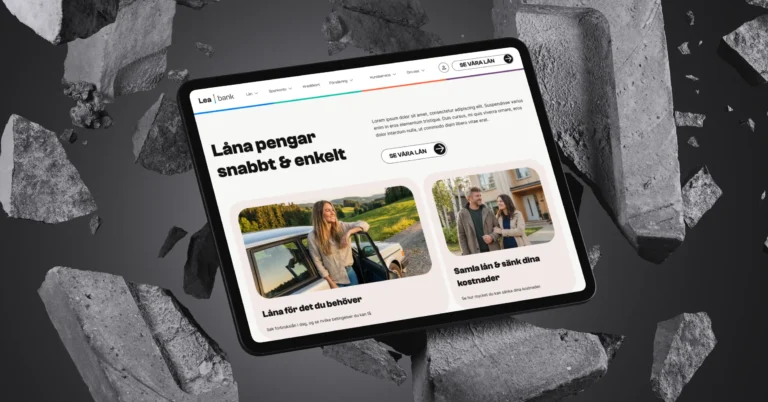 Client Case: Lea BankLea Bank rebuilt its digital platform with Strapi, React, GrowthBook, GA4, and BigQuery to improve SEO, A/B testing, and marketing autonomy.Read the case
Devies
Want a second opinion?
Devies, a Gothenburg-based product and engineering consultancy, works on questions like this with Nordic product and IT teams. Tell us where you are and we will suggest a sensible first step.
Frequently asked questions
Is a wireframe the same as a mockup?
No. A wireframe is a low-fidelity outline of a screen that shows structure and content priority without visual styling. A mockup is a static, high-fidelity picture of how the screen will look, with colours, typography and imagery. Wireframes are for deciding what goes where; mockups are for deciding how it looks. Neither is interactive, which is what separates both from a prototype.
Do we always need wireframes before mockups?
Not always. If the structure is simple, follows an existing pattern or comes straight from a mature design system, you can go from a quick sketch to a mockup or prototype. Wireframes earn their place when the structure is new, contested or complex, because changing a grey box costs minutes while changing a polished screen, or built code, costs far more.
Which tool should we use for wireframes, mockups and prototypes?
Most product teams now use one design tool, such as Figma, for all three, which avoids re-creating work as fidelity rises. Paper and whiteboards remain the fastest option for the earliest wireframes. Coded prototypes make sense when realistic behaviour matters, for example complex forms or data, but their code should be rewritten rather than shipped to production.
Can we test mockups with users?
You can show a mockup to users for first impressions, legibility or brand perception, but it cannot tell you whether people can complete a task, because nothing responds when they click. For task-based usability testing, link the screens into a prototype, even a rough one. Behaviour in a clickable flow is far more reliable than opinions about a static picture.